Guide
Teleprompter speed and eye contact: the mechanics of looking natural
Two numbers decide whether prompting is invisible: how fast you actually speak, and how far your eyes travel to read. This guide gives you the tables and drills to dial both in, plus the scroll mode logic that makes Voice Sync behave like a human operator.
Last reviewed

Know your speaking rate
Speaking rate is measured in words per minute, and most people guess theirs wrong. For orientation, the National Center for Voice and Speech puts conversational English near 150 words per minute and recommends 125 to 150 for a prepared presentation. Record yourself reading a 150-word passage at comfortable presentation pace, time it, and compute: words divided by minutes. That number, not a generic default, is what your scroll settings and script lengths should be built on.
Rates also vary by context. Hooks and key lines run slower; familiar explanation runs faster. Voice-following scroll absorbs this variation automatically, which is precisely why it feels like an operator instead of a metronome.
Do not time a script by how fast you read it silently. A meta-analysis of 190 studies covering 18,573 participants put adult silent reading at about 238 words per minute for non-fiction and reading aloud at about 183 (Brysbaert, Journal of Memory and Language, 2019). A script timed at silent reading speed will overrun by roughly a quarter when you say it out loud.
Speaking rate reference table
Use these ranges as orientation, then measure yourself. Word counts below show what fits common video lengths at each pace.
| Pace | Words per minute | 60-second video | 3-minute video | 10-minute lesson |
|---|---|---|---|---|
| Slow, deliberate | 110 to 130 | about 120 words | about 360 words | about 1,200 words |
| Conversational | 130 to 150 | about 140 words | about 420 words | about 1,400 words |
| Brisk presentation | 150 to 170 | about 160 words | about 480 words | about 1,600 words |
| Fast delivery | 170 to 190 | about 180 words | about 540 words | about 1,800 words |
Ranges, not targets. Measure your own rate and build scripts to fit it; the speaking time calculator does the arithmetic.
The geometry of eye contact
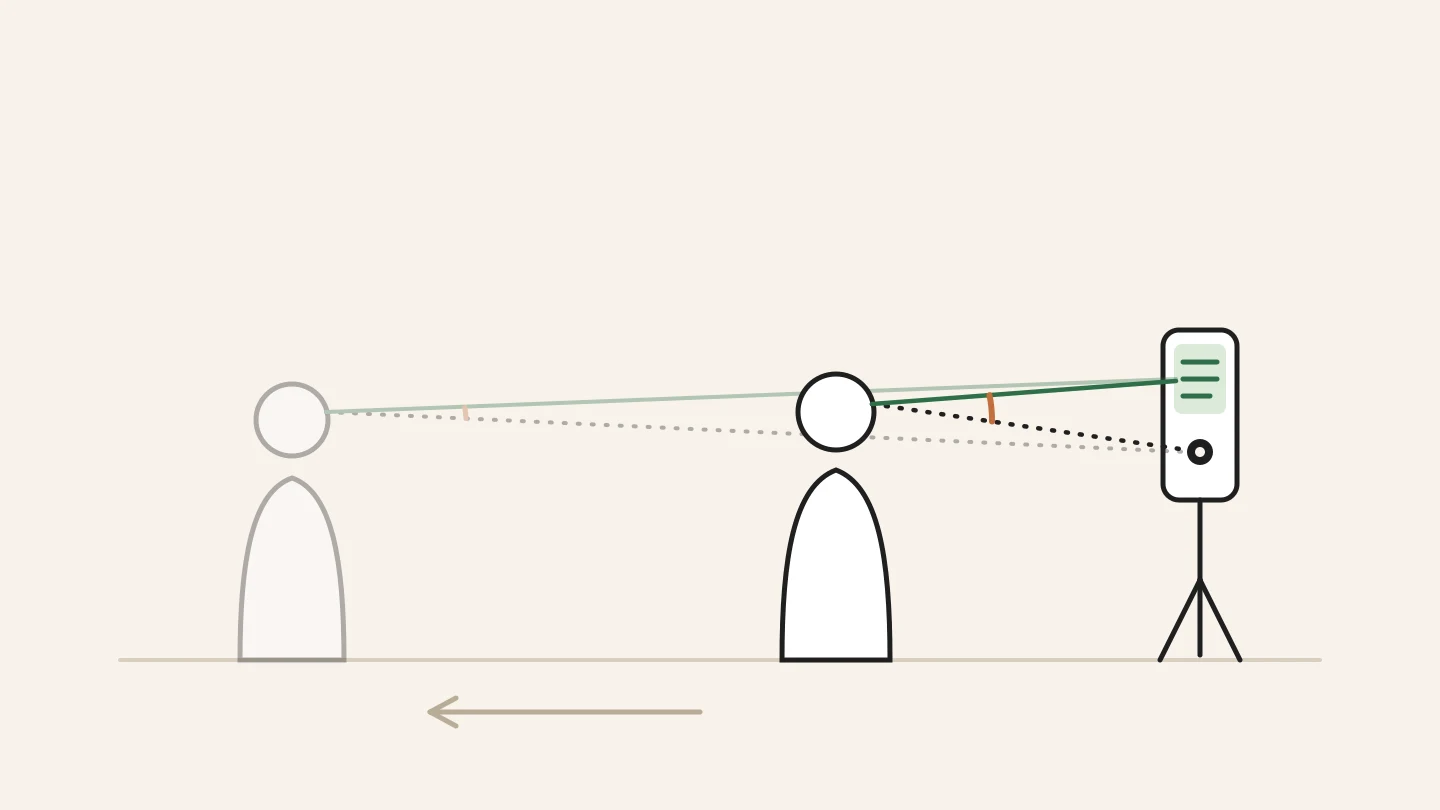
Viewers notice eye movement as an angle, not a distance. The same ten centimeters of eye travel is obvious at thirty centimeters from the screen and invisible at two meters. Three levers shrink the angle: move the prompt closer to the lens, move yourself farther from the device, and shorten the lines so your eyes travel less per line.
In practice: mount the phone at eye level, stand at least arm length away, and keep prompt lines short with narrow margins. Camera prompting mode in AI Teleprompter overlays the script beside the lens, which handles the first lever for you. The other two are your setup choices, and they cost nothing.
Drills that calibrate pace and eyes
Baseline read
Record 60 seconds of scripted reading at your default settings. Watch it muted. Every visible eye flick is a geometry problem; every rushed stretch is a pace problem.
Distance step-back
Repeat the read from fifty centimeters farther away. Note how much less your eyes move on screen. Keep the farthest distance where the text still reads effortlessly.
Pause insertion
Read the same script with a deliberate two-second pause after every key line. With Voice Sync the script waits; notice how the pauses read as confidence.
Rate mapping
Mark your script where you want slow, normal, and fast stretches. Rehearse the transitions, because pace changes at marked points sound intentional instead of erratic.
Fixed speed or voice-following
Fixed speed works when delivery must hit a clock: timed segments, ad reads, rehearsed broadcasts. Set it slightly under your natural rate; a scroll you chase is always obvious. Voice-following suits everything else, because real speech is elastic: it compresses the familiar and stretches the important.
The practical test is the pause. If your delivery includes deliberate pauses, and it should, voice-following is the honest choice. Fixed speed turns every pause into a catch-up sprint, and sprints are audible.

Speed and eye contact mistakes
- Guessing your WPM instead of measuring it once
- Scroll set faster than speech: turns delivery into a permanent sprint
- Prompt far from the lens: every read becomes a visible glance
- Reading too close: small text travel becomes big eye angles
- Long lines: horizontal scanning is the most visible read pattern
- One pace for everything: flat rhythm reads as reading, not talking
Speed and eye contact FAQ
What is a good teleprompter speed?
Your own measured speaking rate. Most presenters land between 130 and 160 words per minute. Set fixed scroll slightly under your rate, or use voice-following scroll so the script adapts continuously.
How do I keep eye contact while reading?
Put the prompt beside or over the lens, stand farther back, and use short lines. Eye contact problems are geometry problems: shrink the angle your eyes travel and the reading disappears.
How many words is a one-minute video script?
Between 120 and 180 words depending on your pace. Measure your rate once, then use the speaking time calculator to convert any script length before recording.
Why do I look like I am reading?
Usually three stacked causes: text too far from the lens, lines too long, and scroll too fast. Fix the geometry first, shorten lines second, and let the scroll follow your voice third.



Record your next video with AI Teleprompter
Download on the App Store and check the available trial. Record inside the app to export your video without the prompt.